

Control Plane for Every AI System
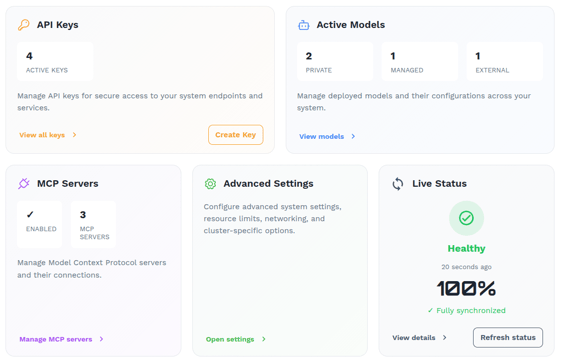
The Prediction Guard admin console allows you to manage every AI system in your environment(s). Track inventories of AI assets (models and MCP servers), access kill switches, configure API keys, and manage throughput in one place.
.webp?width=570&height=317&name=systems%20(1).webp)
Track and control your inventory of AI assets
Organize disparate AI assets (models and MCP servers) into single-tenant "AI systems". You can tailor these various systems according to your needs configuring API keys, model settings, MCP server connections, etc.
Each AI system has its own API gateway where you can manage keys and throughput/ quota, regardless of whether you choose to access remote, third-party models & MCP servers or host those inside your environment.
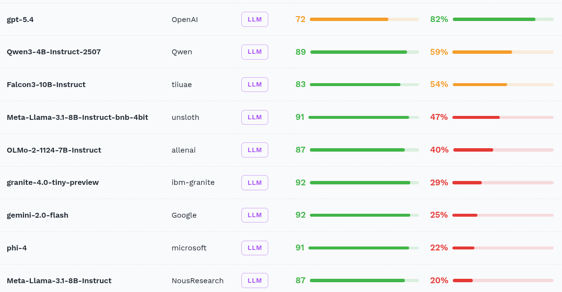
Any Model Vendor. Integrate Self-hosted or via Endpoints.
Prediction Guard is model vendor agnostic. AI systems that are managed in Prediction Guard can include both self-hosted, cloud VPC endpoint, and external/ third party models.
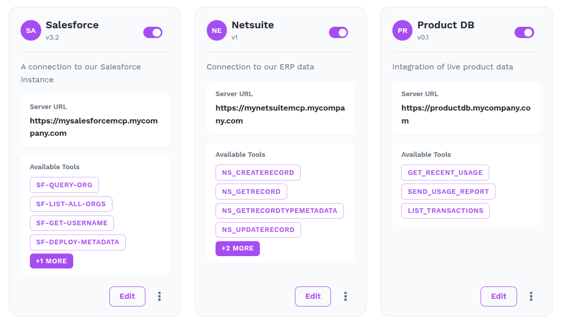
Manage the full inventory of tools used by your agents.
AI agents are much more than a single AI model. They are powered by a distributed system of tools connections and AI model calls. Prediction Guard let's you organize your AI models and MCP servers into single-tenant AI systems for consistent enforcement of access and governance.
Both AI models and assets like MCP servers are available to developers behind an OpenAI and Anthropic compatible APIs for rapid agent development (without losing visibility or control).
Complete Control and Optionality to Manage "Locked down" AI Systems
Ready to Own Your AI Stack?
See how Prediction Guard gives you full sovereignty over every model, agent, and API key in your organization.